Ethan's Blog


  • Home

  • Archives

  • Tags

  • Search

SAP HANA Overview

Posted on 2019-06-30

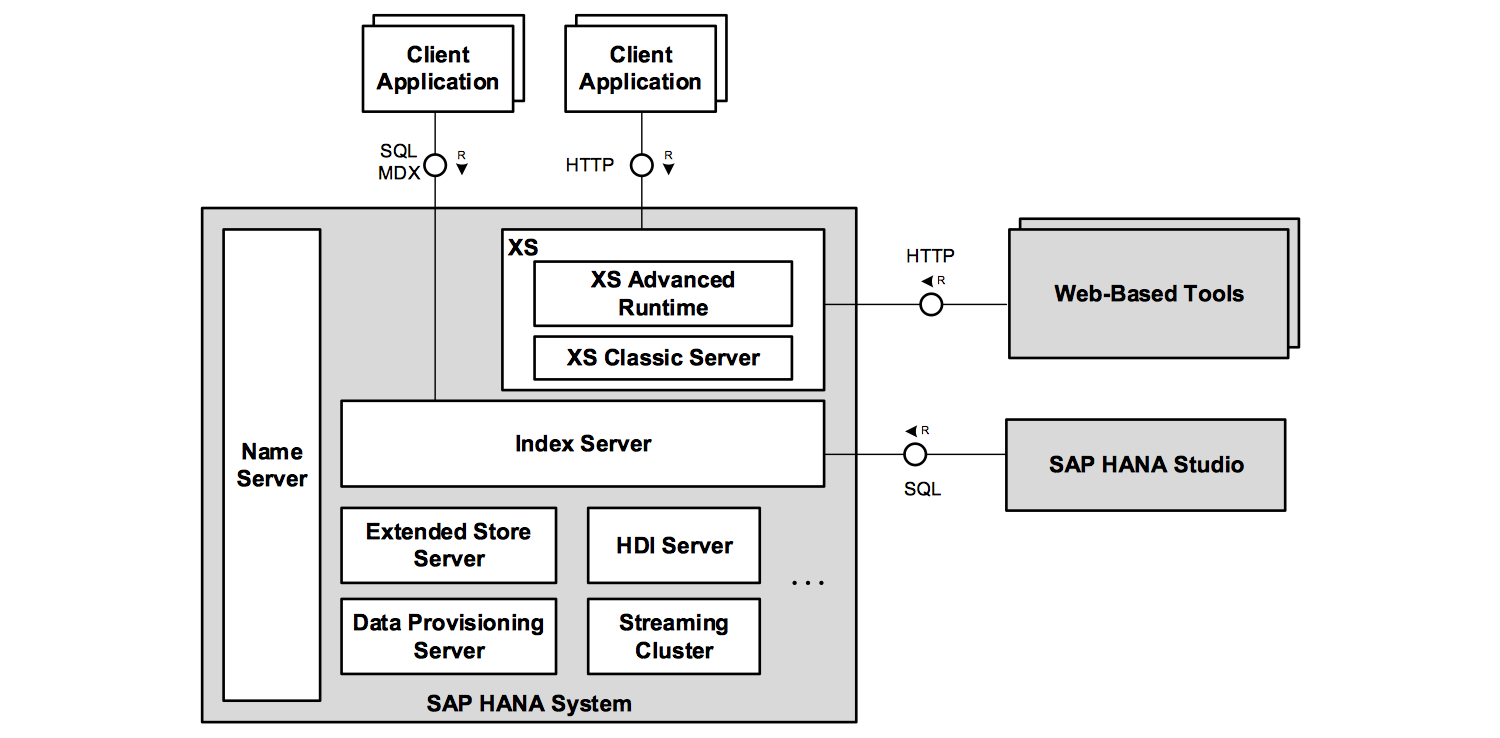
SAP HANA is a data management platform that is deploy as an appliance or in the cloud.
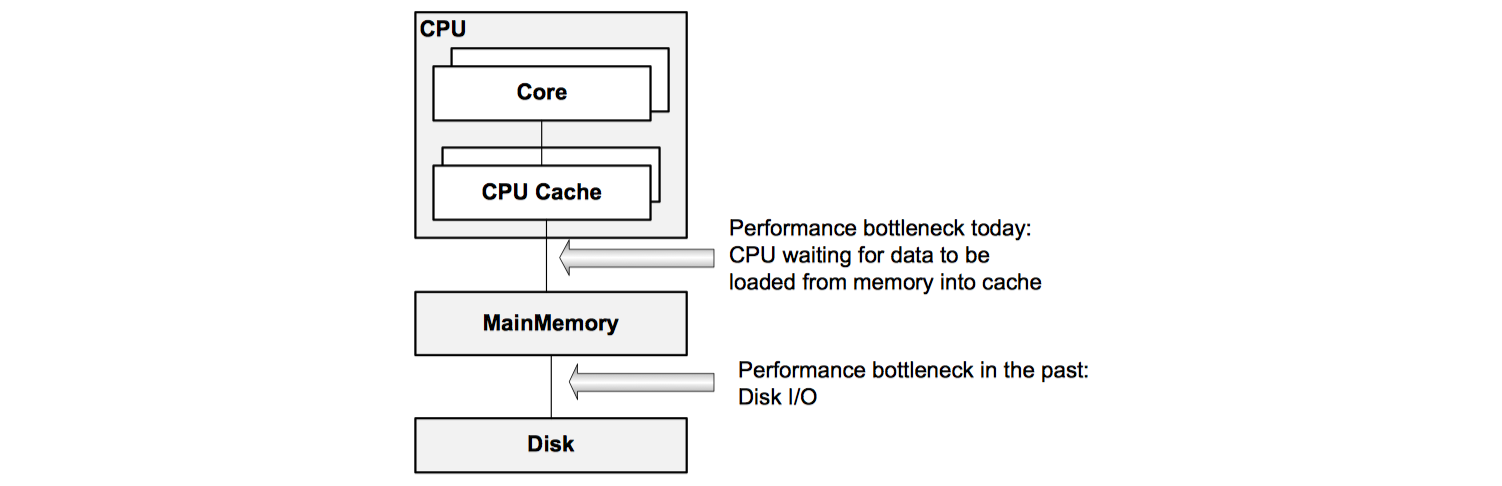
And its core is the SAP HANA database, an innovative in-memory database management system which makes full use of the capabilities of current hardware to increase application performance, to reduce cost of ownership and to enable new scenarios and applications that were not possible before.
The SAP HANA database is a hybrid database management system that combines several paradigms in one system. It includes a full relational database management system where individual tables can be stored column-based or row-based in memory, and column-based on disk.
It supports SQL, transactional isolation and recovery (ACID properties) and high availability. These capabilities are extended with the following features:

  • Text analysis and search capabilities that support a state-of-the-art search experience. This includes full text search with advanced features such as free style search, linguistic search and fault-tolerant fuzzy search.
  • Native support for geo-spatial data and operations.
  • Support for series data.
  • Built-in support for planning applications.
  • SAP HANA provides capabilities for the efficient storage and processing of graph-like data structures with a flexible data schema.
  • A task framework for executing potentially long running tasks. Task can started asynchronously and can be monitored on the level of application-defined steps.
Read more »

端口映射与容器互联

Posted on 2019-06-23

在实践中,经常会碰到多个服务组件容器共同协作的情况,这往往需要多个容器之间,能够互相访问到对方的服务。
Docker 除了通过网络访问外,还提供了两个很方便的功能,来满足服务访问的基本需求:

  • 允许映射容器内应用的服务端口到宿主机。
  • 互联机制实现多个容器间,通过容器名来快速访问。

端口映射实现容器访问

从外部访问容器应用

当容器中运行一些网络应用,要让外部访问这些应用时,可以通过 -P 或 -p 参数来指定端口映射。
当使用 -P 参数时,Docker 会随机映射一个端口到内部容器开放的网络端口:

1
$ docker run -d -P training/webapp python app.py

当使用 -p 参数时,可以指定要映射的端口,并且在一个指定端口上,只可以绑定一个容器。

Read more »

Docker 数据管理

Posted on 2019-06-22

在生产环境中使用 Docker,往往需要对数据进行持久化,或者需要在多个容器之间进行数据共享,这必然涉及容器的数据管理操作。
容器中管理数据主要有两种方式:

  • 数据卷(Data Volumes):宿主机目录直接映射进容器。
  • 数据卷容器(Data Volumes Containers):使用特定容器维护数据卷。

通过这些机制,即使容器在运行中出现故障,用户也不必担心数据发生丢失,只需要快速的重新创建容器即可。

数据卷

数据卷是一个可供容器使用的特殊目录,类似于 Linux 中的 mount 行为。

对数据卷的更新不会影响镜像,解耦开应用和数据。

Read more »

访问 Docker 仓库

Posted on 2019-06-16

仓库(Repository)是集中维护容器镜像的地方,为 Docker 镜像文件的分发和管理提供了便捷的途径,又分为公共仓库和私有仓库。
注册服务器(Registry)是存放仓库的具体服务器,一个注册服务器可以有多个仓库,而每个仓库下面可以有多个镜像。
仓库可以被认为是一个具体的项目或目录,例如对于仓库地址 private-docker.com/ubuntu 来说,private-docker.com 是注册服务器地址,ubuntu 是仓库名。

Docker Hub 公共镜像市场

Docker Hub 是 Docker 官方提供的最大的公共镜像仓库,目前包括了超过 100, 000 的镜像,地址为 https://hub.docker.com。

登陆

可以执行 docker login 命令进行登录,登录成功的用户可以 push 个人制作的镜像到 Docker Hub。

Read more »

操作 Docker 容器

Posted on 2019-06-16

容器是 Docker 的另一个核心概念,容器是镜像的一个运行实例。镜像是静态的只读文件,容器中的应用进程处于运行状态。

创建容器

对容器的操作就像直接操作应用一样简单和快速。

新建容器

可以使用 docker create 命令新建一个容器,新建的容器处于停止状态,可以使用 docker start 命令来启动他。

1
$ docker create -it ubuntu:latest

容器是整个 Docker 技术栈的核心,支持的选项十分复杂。主要包括如下几大类:

  • 与容器运行模式相关
  • 与容器环境配置相关
  • 与容器资源限制和安全保护相关
Read more »
1…464748…55
necusjz

necusjz

271 posts
16 tags
© 2016 - 2026 necusjz
Powered by Hexo
Theme - NexT.Mist